Using Self-Managed source control providers
Stack Automation can integrate with any source control provider, whether it's a public SaaS platform (e.g., github.com) or a self-managed instance running on your premises. When using a self-managed source control provider, the communication between Stack Automation and the source control server is fully contained within your site, happening between the Stack Automation management server installed on your cluster and the source control server installed on your premises.
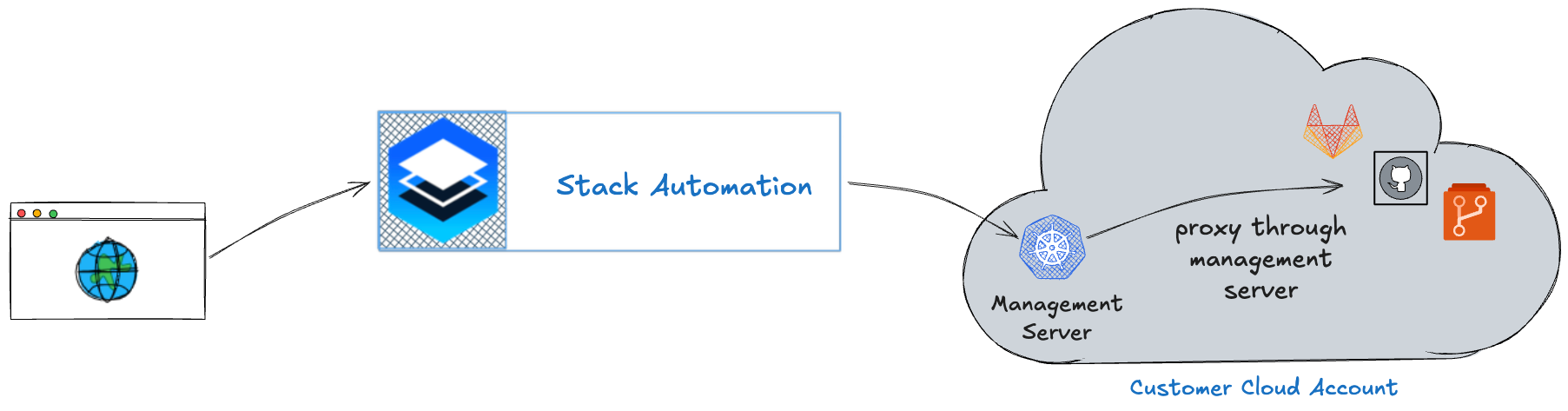
There are three steps when configuring Stack Automation to read from a self-hosted source control provider:
- Install a Management Server
- Generate a Personal Access Token
- Add your repositories to Stack Automation (Can be done from the Stack Automation UI, API, or Stack Automation Terraform Provider)
See the following sections with specific details how to configure each self-managed source control provider:
- GitHub Enterprise (on-premise)
- GitLab on-premise
- BitBucket Enterprise (on-premise)
- Azure Repositories on-premise - Supported, Please contact support for detailed instructions
With a self-managed source control provider configured in Stack Automation, you can securely manage and version control your assets stored in your on-premises source control system, while keeping all communication within your network boundaries.